
Verify and route webhooks.
In your infrastructure.
Receive signed webhooks and deliver verified events to your queues, streams, databases and APIs. Also handle HTTP requests and expose selected APIs through authenticated MCP endpoints and let compatible agents subscribe to business events.
Design a flow, export the YAML, and deploy it in your infrastructure. Test deployed MCP tools from the builder; apply configuration changes through your deployment process.
Send events to 15 destination types.
Declare your destinations once. Connect them in any flow.
Start Temporal workflows; your workers process the events.
Handle HTTP requests and return the result
Use Hookway as a reverse proxy or a synchronous request handler. Ordinary HTTP clients can call these routes directly.
Proxy to an upstream API
Authenticate the caller, select which method, path, headers, query parameters and body to forward, then return the upstream status, body and allowed response headers on the same connection.
Build a synchronous handler
Validate, transform and branch on request data before returning a configured status, headers and body. Add API calls where your handler needs them. Webhook delivery, synchronous HTTP routes and MCP endpoints can share the same Hookway deployment.
Give agents tools and events
Import APIs as MCP tools. Let compatible agents subscribe to events and look up details when something changes.
Import the operations you choose
Upload an OpenAPI spec, select operations, and review the generated flow before exporting YAML.
Set each agent’s access
Use API keys or an external OAuth provider. Grant tools and events per caller; keep upstream credentials separate.
Let events start the next step
Publish named events from your flows. Subscribed clients receive matching events through signed webhooks.
“When an issue opens, fetch its details.”
For clients that support MCP Events, including ChatGPT Work.
A webhook creates a named event
issue.openedVerify the sender and validate the event payload.
Hookway delivers the matching event
Signed callback → subscribed agentSubscription filters decide which events reach the agent.
The agent looks up the details
get_issueAn authenticated tool retrieves details from your API.
Inspect and recover event delivery
Inspect callback attempts, retry eligible failures, or revoke a subscription from the console. Callback acceptance confirms receipt; the agent’s work is tracked by its client.
Webhooks, HTTP handlers and MCP tools in the same builder
Choose how requests are verified, transformed and routed. Build visually or configure the same flows in YAML.
Where an event is published, how an HTTP request returns, and which APIs an agent can call.
Send events to the systems you run
Publish to 15 destination types: queues, streams, databases, S3, Lambda and HTTP webhooks. Reuse credentials with named connections.
Handle synchronous HTTP requests
Proxy to an API or run a native handler. Check and transform requests, then return your configured response or the upstream status and body on the same connection.
Expose APIs as MCP tools
Import an OpenAPI spec, select operations, and review the generated tools. Give each caller explicit permissions with API keys or OAuth.
Create a flow, import existing YAML, or export a configuration. No sign-in required. Open the public builder
Define the flow in YAML
Follow one request from configuration to delivery. The diagram matches the node IDs and edges in this YAML.
One GitHub webhook, end to end
inReceive
POST /webhooks/github
rlRate limit
600 requests/min · burst of 60
bodyRead the body
Up to 1 MiB
authVerify the signature
HMAC SHA-256 · your webhook secret
envBuild the envelope
Wrap the verified event for delivery
outPublish to orders
https://example.com/events
edges connect these node IDs in order. Requests that fail a limit or signature check stop before publication.Fan out without duplicate handlers
A condition can stop one branch without blocking delivery on the others.
Control load, monitor delivery, and recover failures
Size your deployment with published benchmarks. Then watch request latency, delivery outcomes and capacity pressure with Prometheus and the included Grafana dashboards.
Measured under burst and sustained traffic
October 1, 2026 · local Docker · two replicas, each with 2 vCPU and 4 GiB · synthetic destination.
- Burst traffic
5,000 requests/s
Three 20-second bursts; 300,000 of 300,000 requests completed within five seconds.
- Sustained workload
900,000 requests
500 requests/s for 30 minutes; every planned request completed with its expected response.
- Sustained p99 latency
25–50 ms
Histogram upper bounds across fixed, signed and lookup routes in the 500 requests/s run.
Recorded ingress workloads, not a production capacity guarantee. Shared protection, replay and MCP require separate sizing. Results and methodology
Find the bottleneck
Track request and node latency, active requests and admission rejections to see where traffic slows down.
Watch delivery outcomes
Monitor publication errors and retries. Enable replay to investigate and recover captured failures.
Understand tool calls
Track MCP call outcomes and duration by flow and tool, without putting payloads in metrics.
Operational defaults and deployment options
Limit simultaneous requests
256 active requests per replica by default
- At capacity, new requests get 503 and Retry-After before their bodies are read. You can enable a short wait for capacity.
Retry failed deliveries
3 webhook attempts; waits from 500ms to 30s
- Webhook, Kafka and RabbitMQ retry with increasing waits. Only webhook handles 429 Retry-After or sends failures to an optional dead-letter destination.
Exports Prometheus metrics
76 core Prometheus metrics exported
- Enable Prometheus metrics to track requests, failures, and delivery latency. Grafana dashboards are included.
Set access rules for each flow
16 authentication formats
- Reject invalid senders and duplicates. Use memory for one replica, or Redis/PostgreSQL for shared protection.
Core runs as one binary
1 static binary, non-root
- A scratch image with outbound TLS 1.2 or newer. Add Redis or PostgreSQL for shared protection. No replay service is required unless you add replay.
Recover failures and inspect webhooks
7 days of replay retention by default
- Use the optional replay console to retry failed deliveries after a sender’s 2xx, or spot-check webhooks with view-only inspections.
Recover missed deliveries with the replay console
The sender got a success response, but a destination missed the event. The optional replay service can retain that failure for your team to investigate and recover. Capture is best effort; it is not a durable queue for every incoming event.
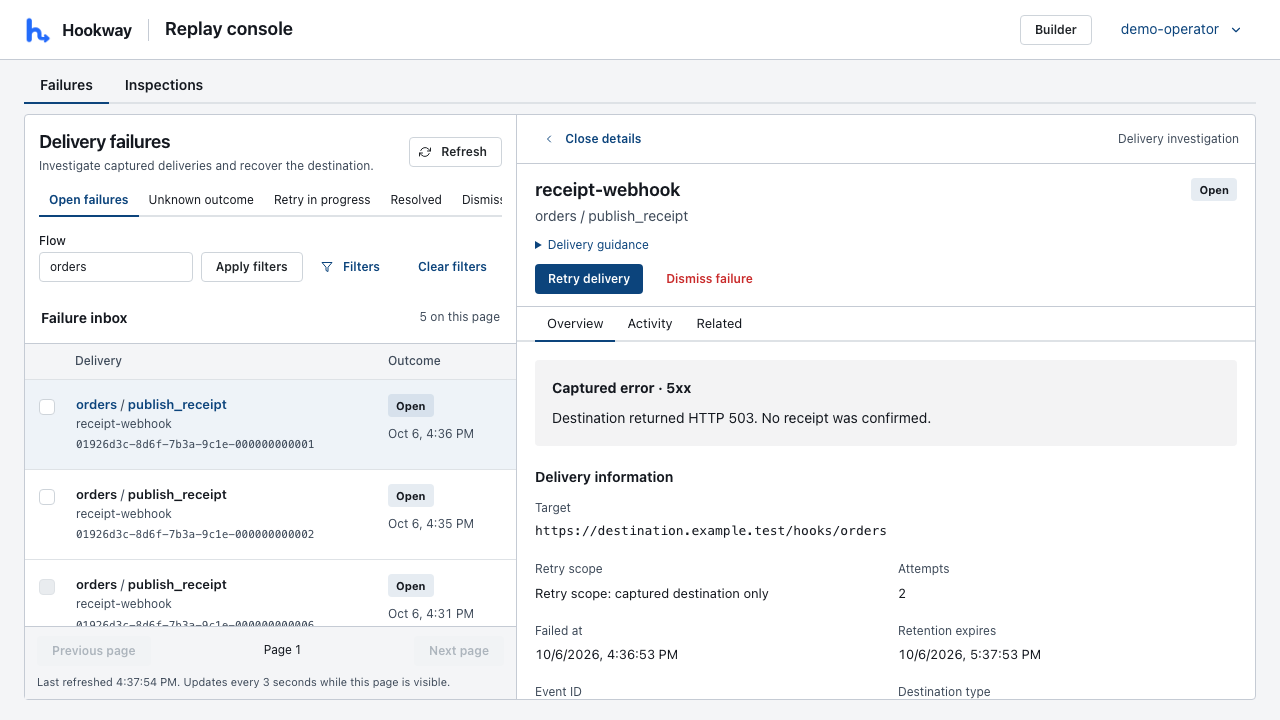
Inspect the failure
See the destination, captured error, payload and delivery history together. Filter the inbox to find the events that need attention.
Understand the outcome
When delivery is uncertain, check the receiving system before sending again. Record independent confirmation and keep the original evidence.
Retry that destination
Request another attempt for the failed destination without rerunning the whole flow. Follow its result and any downstream failures.
Just need to inspect a sample?
For spot checks, put Sample → Inspect on a separate branch while Publish receives every event. Inspections are view only: see the current body and context, or download captured files. Uploads are best effort and share replay storage and retention limits. See the sampled inspection example.
See Hookway in context
Explore working examples or compare Hookway with other webhook and API tools.
Use request data to choose the destination
Examples show how to store uploaded files, clean up XML, send one event to several systems, and choose destinations from request data. Variables can come from a path, JSON body, or filtered header, then select a target such as {envName}-events.
Compare Hookway with other products
Compare deployment, delivery and MCP tools with Hookdeck Event Gateway and Convoy. Includes source links and a separate look at Outpost.
View the comparisonFrom your first flow to production
Start with a working configuration. Find the details as you need them.
Run your first flow
Run Hookway locally, change an example, and follow a request through your infrastructure.
- Overview and quick start
What Hookway is and how to run it locally.
- Example configs
YAML templates for authenticated MCP tools, XML, multipart, routing, and every destination.
- MCP gateway guide
Configure endpoints, tool catalogues, and who can call them.
- Local development
Run the stack, stop a destination, and replay what it missed.
Build a flow
- Configuration reference
YAML fields, defaults, and examples.
- Ingress adapters
SQS/SNS, routing, credential profiles, batches and document relays.
- CLI reference
Core and replay commands, configuration checks and operations.
- Validate JSON
Check schemas and samples before sending data downstream.
Deploy and operate
- Performance measurements
Burst and sustained results, hardware, methodology and limits.
- Replay operations
Recover failed deliveries and view captured webhooks with the optional replay service.
- Rate limits and duplicate protection
Use memory, Redis, or PostgreSQL to control requests and duplicates.
- Security model
Signature verification, auth, and the threat model.
Run Hookway locally
Clone the repo and start the example stack. No hosted account required.
$ git clone --branch main https://github.com/jaysongiroux/hook_way.git && cd hook_way && make dev-up